Configure Sendmail with TLS on Debian Linux
1. Download source files
- wget http://download.oracle.com/berkeley-db/db-4.7.25.NC.tar.gz
- wget ftp://ftp.andrew.cmu.edu/pub/cyrus-mail/cyrus-sasl-2.1.25.tar.gz
- wget ftp://ftp.sendmail.org/pub/sendmail/sendmail-current.tar.gz
- wget https://www.openssl.org/source/old/1.1.0/openssl-1.1.0.tar.gz
2. Install Berkeley DB
If you have met this error message when configure sendmail with 'makemap hash access > access', please install Berkeley DB firstly.
makemap: Need to recompile with -DNEWDB for hash support
# tar db-4.7.25.NC.tar.gz
cd db-*/build_unix
../dist/configure
make && make install
echo "/usr/local/BerkeleyDB.4.7/lib/" >> /etc/ld.so.conf
ldconfig
3. Install Cyrus-sasl2
For openssl updating, if you really know what you are doing, please search the internet or wait for my next note. Here is Cyrus-sasl2 installation how-to:
# tar -xvf cyrus-sasl-2.1.25.tar.gz
cd cyrus-*
./configure --enable-anon --enable-plain --enable-login --disable-krb4 --with-saslauthd=/var/run/saslauthd --with-pam --with-openssl=/usr/local/ssl --with-plugindir=/usr/local/lib/sasl2 --enable-cram --enable-digest --enable-otp
make && make install
# mv /usr/lib/sasl2 /usr/lib/sasl2_orig
# echo "pwcheck_method: saslauthd" > /usr/local/lib/sasl2/Sendmail.conf
echo "mech_list: login plain" >> /usr/local/lib/sasl2/Sendmail.conf
mkdir -p /var/run/saslauthd
# mkdir -p /usr/man
mkdir -p /usr/man/man1
mkdir -p /usr/man/man8
cp -pfr /usr/local/lib/sasl2 /usr/lib/sasl2
echo /usr/lib/sasl2 >> /etc/ld.so.conf
ldconfig
If '/usr/include/openssl' exist, ignore the next line.
# ln -s /usr/local/ssl/include/openssl /usr/include/openssl
Create init script for Cyrus-sasl2 '/etc/init.d/saslauthd' with following contents:
#!/bin/sh -e NAME=saslauthd DAEMON="/usr/sbin/${NAME}" DESC="SASL Authentication Daemon" DEFAULTS=/etc/default/saslauthd test -f "${DAEMON}" || exit 0
Source defaults file; edit that file to configure this script.
if [ -e "${DEFAULTS}" ]; then . "${DEFAULTS}" fi
If we're not to start the daemon, simply exit
if [ "${START}" != "yes" ]; then exit 0 fi
If we have no mechanisms defined
if [ "x${MECHANISMS}" = "x" ]; then echo "You need to configure ${DEFAULTS} with mechanisms to be used" exit 0 fi
Add our mechanimsms with the necessary flag
for i in ${MECHANISMS}; do PARAMS="${PARAMS} -a ${i}" done
Consider our options
case "${1}" in start) echo -n "Starting ${DESC}: " ln -fs /var/spool/postfix/var/run/${NAME} /var/run/${NAME} ${DAEMON} ${PARAMS} echo "${NAME}." ;; stop) echo -n "Stopping ${DESC}: " PROCS=`ps aux | grep -iw '/usr/sbin/saslauthd' | grep -v 'grep' |awk '{print $2}' | tr '\n' ' '` if [ "x${PROCS}" != "x" ]; then kill -15 ${PROCS} &> /dev/null fi echo "${NAME}." ;; restart|force-reload) $0 stop sleep 1 $0 start echo "${NAME}." ;; *) echo "Usage: /etc/init.d/${NAME} {start|stop|restart|force-reload}" >&2 exit 1 ;; esac exit 0
# chmod 755 /etc/init.d/saslauthd
Add script above to system boot run level:
ln -s /etc/init.d/saslauthd /etc/rc2.d/S20saslauthd ln -s /etc/init.d/saslauthd /etc/rc3.d/S20saslauthd ln -s /etc/init.d/saslauthd /etc/rc4.d/S20saslauthd ln -s /etc/init.d/saslauthd /etc/rc5.d/S20saslauthd ln -s /etc/init.d/saslauthd /etc/rc0.d/K20saslauthd ln -s /etc/init.d/saslauthd /etc/rc1.d/K20saslauthd ln -s /etc/init.d/saslauthd /etc/rc6.d/K20saslauthd
Create file '/etc/default/saslauthd':
# This needs to be uncommented before saslauthd will be run automatically START=yes
You must specify the authentication mechanisms you wish to use.
This defaults to "pam" for PAM support, but may also include
"shadow" or "sasldb"
MECHANISMS=shadow
If 'saslauthd' is found located in '/usr/local/sbin' instead of '/usr/sbin', create symbolic link followed:
# ln -s /usr/local/sbin/saslauthd /usr/sbin/saslauthd
4. Generate certificates for TLS
# mkdir -p /etc/mail/certs
cd /etc/mail/certs
openssl req -new -x509 -keyout cakey.pem -out cacert.pem -days 365
Type the words if needs.
# openssl req -nodes -new -x509 -keyout sendmail.pem -out sendmail.pem -days 365 Type the words if needed.
# chmod 600 ./sendmail.pem
5. Compile and install sendmail
# tar -xvf sendmail-current.tar.gz # cd sendmail-*/devtools/Site/
Create the file 'site.config.m4' with following contents:
# makemap configuration APPENDDEF(`confMAPDEF', `-DNEWDB') APPENDDEF(`confLIBS', `-ldb') APPENDDEF(`confINCDIRS', `-I/usr/local/BerkeleyDB.4.7/include') APPENDDEF(`confLIBDIRS', `-L/usr/local/BerkeleyDB.4.7/lib')
SASL2 (smtp authentication)
APPENDDEF(`confENVDEF', `-DSASL=2') APPENDDEF(`conf_sendmail_LIBS', `-lsasl2')
STARTTLS (smtp + tls/ssl)
APPENDDEF(`conf_sendmail_ENVDEF', `-DSTARTTLS') APPENDDEF(`conf_sendmail_ENVDEF', `-D_FFR_SMTP_SSL') APPENDDEF(`conf_sendmail_LIBS', `-lssl -lcrypto -L/usr/local/ssl/lib')
# cd ~/sendmail-*/
useradd smmsp
groupadd smmsp
./Build -c
./Build install
create sendmail.mc with following contents: # cd ./cf/cf
dnl ### do SMTPAUTH define(`confAUTH_MECHANISMS', `LOGIN PLAIN DIGEST-MD5 CRAM-MD5')dnl TRUST_AUTH_MECH(`LOGIN PLAIN DIGEST-MD5 CRAM-MD5')dnl dnl ### do STARTTLS define(`confCACERT_PATH', `/etc/mail/certs')dnl define(`confCACERT', `/etc/mail/certs/cacert.pem')dnl define(`confSERVER_CERT', `/etc/mail/certs/sendmail.pem')dnl define(`confSERVER_KEY', `/etc/mail/certs/sendmail.pem')dnl define(`confCLIENT_CERT', `/etc/mail/certs/sendmail.pem')dnl define(`confCLIENT_KEY', `/etc/mail/certs/sendmail.pem')dnl DAEMON_OPTIONS(`Family=inet, Port=465, Name=MTA-SSL, M=s')dnl dnl ### define(`confDEF_CHAR_SET', `iso-8859-1')dnl define(`confMAX_MESSAGE_SIZE', `15000000')dnl Denial of Service Attacks define(`confMAX_DAEMON_CHILDREN', `30')dnl Denial of Service Attacks define(`confCONNECTION_RATE_THROTTLE', `2')dnl Denial of Service Attacks define(`confMAXRCPTSPERMESSAGE', `50')dnl Denial of service Attacks define(`confSINGLE_LINE_FROM_HEADER', `True')dnl define(`confSMTP_LOGIN_MSG', `$j')dnl define(`confDONT_PROBE_INTERFACES', `True')dnl define(`confTO_INITIAL', `6m')dnl define(`confTO_CONNECT', `20s')dnl define(`confTO_HELO', `5m')dnl define(`confTO_HOSTSTATUS', `2m')dnl define(`confTO_DATAINIT', `6m')dnl define(`confTO_DATABLOCK', `35m')dnl define(`confTO_DATAFINAL', `35m')dnl define(`confDIAL_DELAY', `20s')dnl define(`confNO_RCPT_ACTION', `add-apparently-to')dnl define(`confALIAS_WAIT', `0')dnl define(`confMAX_HOP', `35')dnl define(`confQUEUE_LA', `5')dnl define(`confREFUSE_LA', `12')dnl define(`confSEPARATE_PROC', `False')dnl define(`confCON_EXPENSIVE', `true')dnl define(`confWORK_RECIPIENT_FACTOR', `1000')dnl define(`confWORK_TIME_FACTOR', `3000')dnl define(`confQUEUE_SORT_ORDER', `Time')dnl define(`confPRIVACY_FLAGS', `authwarnings,goaway,restrictmailq,restrictqrun,needmailhelo')dnl OSTYPE(linux)dnl FEATURE(`delay_checks')dnl FEATURE(`generics_entire_domain')dnl FEATURE(`local_procmail')dnl FEATURE(`masquerade_envelope')dnl FEATURE(`nouucp',`reject')dnl FEATURE(`redirect')dnl FEATURE(`relay_entire_domain')dnl FEATURE(`use_cw_file')dnl FEATURE(`virtuser_entire_domain')dnl FEATURE(dnsbl,`blackholes.mail-abuse.org', ` Mail from $&{client_addr} rejected; see http://mail-abuse.org/cgi-bin/lookup?$& {client_addr}')dnl FEATURE(dnsbl,`dialups.mail-abuse.org', ` Mail from dial-up rejected; see http://mail-abuse.org/dul/enduser.htm')dnl FEATURE(`virtusertable',`hash -o /etc/mail/virtusertable')dnl FEATURE(access_db)dnl FEATURE(lookupdotdomain)dnl FEATURE(`blacklist_recipients')dnl FEATURE(`no_default_msa')dnl DAEMON_OPTIONS(`Port=smtp, Name=MTA')dnl MAILER(local)dnl MAILER(smtp)dnl MAILER(procmail)dnl
Generate '/etc/mail/sendmail.cf' with 'sendmail.mc' we just created.
# ./Build sendmail.cf
cp sendmail.cf /etc/mail/sendmail.cf
create necessary files:
# cd /etc/mail/
touch /etc/mail/local-host-names
touch /etc/mail/virtusertable
/usr/sbin/makemap hash virtusertable < virtusertable
mkdir -p /var/spool/mqueue
chmod 700 /var/spool/mqueue
chown root:root /var/spool/mqueue
chown root:root /etc/mail/sendmail.cf
chmod 444 /etc/mail/sendmail.cf
chown root:root /etc/mail/submit.cf
chmod 444 /etc/mail/submit.cf
touch /etc/mail/aliases
newaliases
touch /etc/mail/access
/usr/sbin/makemap hash access < access
create init script for sendmail '/etc/init.d/sendmail' with following contents:
#! /bin/sh case "$1" in start) echo "Initializing SMTP port. (sendmail)" /usr/sbin/sendmail -bd -q1h ;; stop) echo "Shutting down SMTP port:" killall /usr/sbin/sendmail ;; restart|reload) $0 stop && $0 start ;; *) echo "Usage: $0 {start|stop|restart|reload}" exit 1 esac exit 0
# chmod 755 /etc/init.d/sendmail
Add sendmail to boot run level:
ln -s /etc/init.d/sendmail /etc/rc2.d/S20sendmail ln -s /etc/init.d/sendmail /etc/rc3.d/S20sendmail ln -s /etc/init.d/sendmail /etc/rc4.d/S20sendmail ln -s /etc/init.d/sendmail /etc/rc5.d/S20sendmail ln -s /etc/init.d/sendmail /etc/rc0.d/K20sendmail ln -s /etc/init.d/sendmail /etc/rc1.d/K20sendmail ln -s /etc/init.d/sendmail /etc/rc6.d/K20sendmail
6. Start 'saslauthd' and 'sendmail'
# /etc/init.d/saslauthd start
/etc/init.d/sendmail start
7. Test the configurations
# /usr/sbin/sendmail -d0.1 -bv root
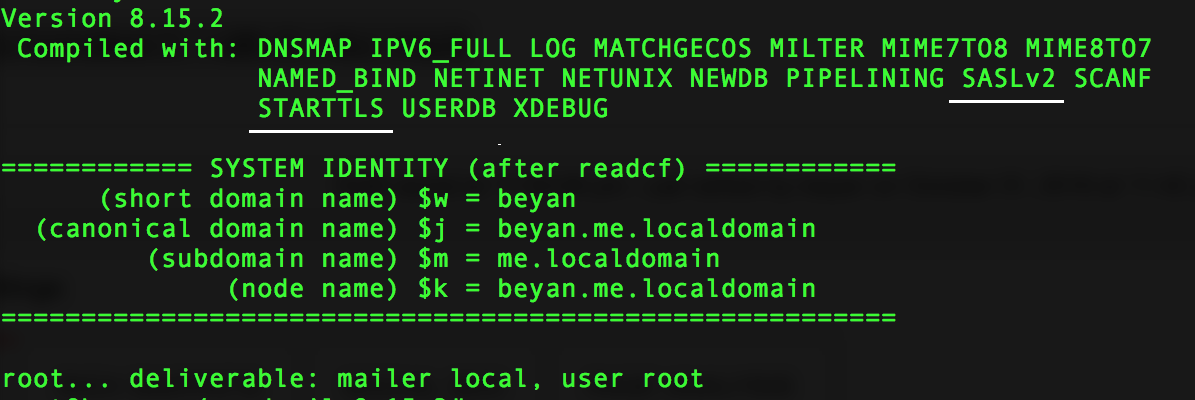 If you find 'SASLv2' and 'STARTTLS' in the output, it means compiled successfully.
# telnet localhost 25
After connected, Type:
hell localhost
If the output include '250-STARTTLS' and '250-AUTH', then it's time to configure mail client with TLS. 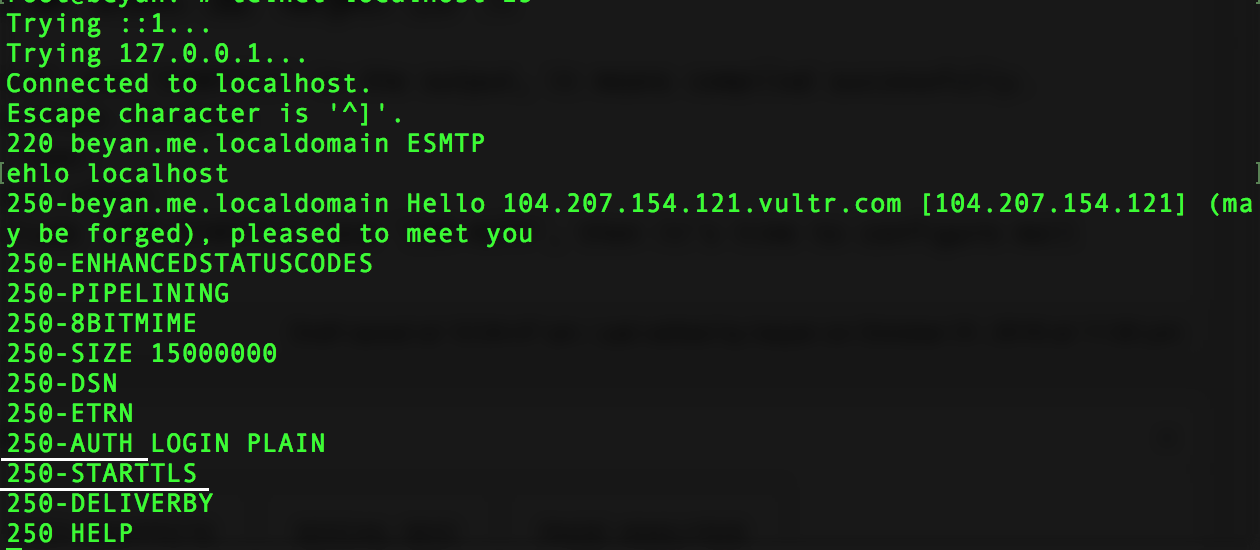 The last thing, remember to install 'procmail'
# apt-get install procmail
Comments
Loading comments...
Leave a comment